Map colors to values from jefferys/FusionExpressionPlot by Stuart R. Jefferys Maps colors to a vector of numeric data based on a palette of colors and a vector of bin ends. Can use either a named palette from the RColorBrewer package or a list of explicit colors. Data is binned and labeled with the associated color as per mapLabels. This is not intended to produce a smooth gradient, but instead compresses the information in the data into a discrete set of colors.
mapColors.RdThis is really just a convenience function to allow using color brewer
palettes easily when binning data. Colors are no different than other labels
and can be applied generically using mapLabels. Note, this
requires the RColorBrewer package if using brewerPaletteName
Arguments
- x
The vector of numeric data to map to a color
- binEnds
The sequence of cut-points defining the bins into which the data will be split. Each bin will correspond to a color in the color vector or palette and provides for mapping each value to a color. Values exactly matching bin ends will be in the lower bin.
NAs or values outside the range will map toNA. Normally the first and last bin ends are the special valuesInfand-Inf. Note: bin ends will be sorted from smallest to largest before mapping, so make sure labels are ordered to match.- brewerPaletteName
The name of the RColorBrewer palette to use for bin labels, by default
'RdBu'. Setting labels causes this to be ignored.- reverse
Reverse the order of the colors. If explicitly specifying the colors though
colors, one could instead just reverse them. However, when usingbrewerPaletteName, this is the only way to reverse the palette order. The default value is FALSE.- colors
A vector of colors to use as bin names. The number of colors will have to be one less than the number of bin ends. If this is specified, any
brewerPaletteNameis ignored and the RColorBrewer package is not needed
Color Brewer Palettes
If no colors are specified, a vector of colors will be assigned using the
brewer palette named, 'RdBu' if not specified. Each palette comes
in multiple variants with a different number of colors. The number of
colors will be determined automatically from the binEnds provided.
Using color brewer palettes is just a convenient shortcut to specifying a
list of colors and is ignored if a vector of colors is specified. If no
version of the given brewer palette has the number of levels required by
the bin ends, an error will occur.
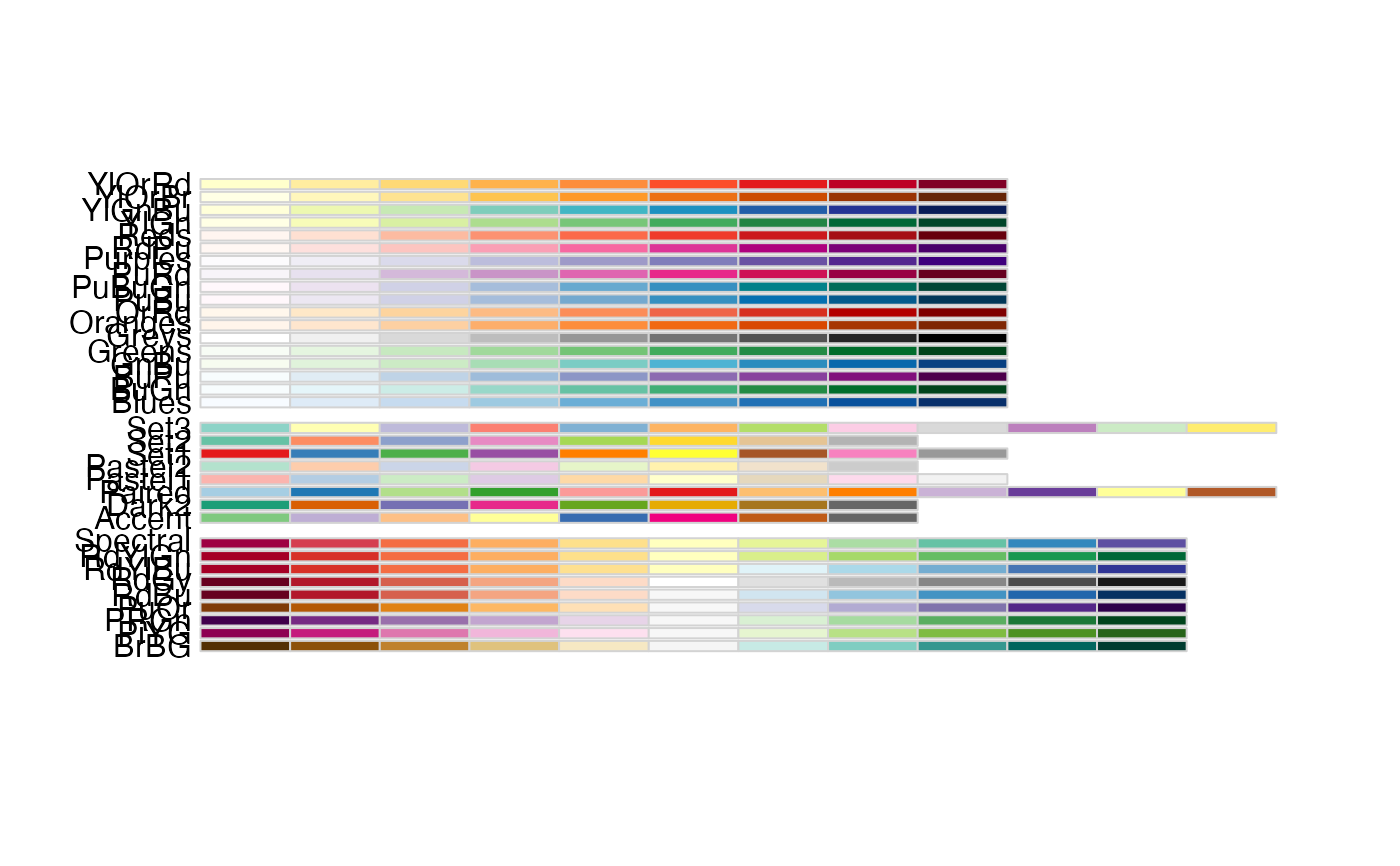
For diverging values, can have 3 - 11 bins, allowed values are:
BrBG PiYG PRGn PuOr RdBu RdGy RdYlBu RdYlGn SpectralFor sequential values, can have 3 - 8 bins, allowed values are:
Blues BuGn BuPu GnBu Greens Greys Oranges OrRd PuBu PuBuGn PuRd
Purples RdPu Reds YlGn YlGnBu YlOrBr YlOrRdFor qualitative palettes, can have 3 to (n) bins where n varies by palette:
Accent (8), Dark2 (8), Paired (12), Pastel1 (9), Pastel2 (8),
Set1 (9), Set2 (8), Set3 (12)
Note: palettes are only specified in one direction, and binEnds are always sorted from lowest to highest before using, so set reverse=TRUE if you want to reverse the color order.
Examples
library(RColorBrewer);
### Review from RColorBrewer
# Display available palettes
display.brewer.all()
 # Display colors in a palette
paletteName <- "RdBu"
levels <- 4
RColorBrewer::brewer.pal(levels, paletteName)
#> [1] "#CA0020" "#F4A582" "#92C5DE" "#0571B0"
### Using mapColors
x <- c(-100, -1, 0, 1, 100)
ends <- c(-Inf,-10,10,Inf)
# Map data to 3 colors using the default (RdBu) palette
mapColors( x, binEnds= ends )
#> [1] "#EF8A62" "#F7F7F7" "#F7F7F7" "#F7F7F7" "#67A9CF"
#=> [1] "#EF8A62" "#F7F7F7" "#F7F7F7" "#F7F7F7" "#67A9CF"
# Map data to 3 colors using the reverse of the default (RdBu) palette
mapColors( x, binEnds= ends, reverse= TRUE)
#> [1] "#67A9CF" "#F7F7F7" "#F7F7F7" "#F7F7F7" "#EF8A62"
#=> [1] "#67A9CF" "#F7F7F7" "#F7F7F7" "#F7F7F7" "#EF8A62"
# Map to a specified palette name
mapColors( x, binEnds= ends, brewerPaletteName= 'Set1' )
#> [1] "#E41A1C" "#377EB8" "#377EB8" "#377EB8" "#4DAF4A"
#=> [1] "#E41A1C" "#377EB8" "#377EB8" "#377EB8" "#4DAF4A"
# Map data using an explicit color vector
colorMap <- c('red', 'violet', 'blue')
mapColors( x, binEnds= ends, colors= colorMap)
#> [1] "red" "violet" "violet" "violet" "blue"
#=> [1] "red" "violet" "violet" "violet" "blue"
mapColors( x, binEnds= ends, colors= colorMap, reverse= TRUE)
#> [1] "blue" "violet" "violet" "violet" "red"
#=> [1] "blue" "violet" "violet" "violet" "red"
# Display colors in a palette
paletteName <- "RdBu"
levels <- 4
RColorBrewer::brewer.pal(levels, paletteName)
#> [1] "#CA0020" "#F4A582" "#92C5DE" "#0571B0"
### Using mapColors
x <- c(-100, -1, 0, 1, 100)
ends <- c(-Inf,-10,10,Inf)
# Map data to 3 colors using the default (RdBu) palette
mapColors( x, binEnds= ends )
#> [1] "#EF8A62" "#F7F7F7" "#F7F7F7" "#F7F7F7" "#67A9CF"
#=> [1] "#EF8A62" "#F7F7F7" "#F7F7F7" "#F7F7F7" "#67A9CF"
# Map data to 3 colors using the reverse of the default (RdBu) palette
mapColors( x, binEnds= ends, reverse= TRUE)
#> [1] "#67A9CF" "#F7F7F7" "#F7F7F7" "#F7F7F7" "#EF8A62"
#=> [1] "#67A9CF" "#F7F7F7" "#F7F7F7" "#F7F7F7" "#EF8A62"
# Map to a specified palette name
mapColors( x, binEnds= ends, brewerPaletteName= 'Set1' )
#> [1] "#E41A1C" "#377EB8" "#377EB8" "#377EB8" "#4DAF4A"
#=> [1] "#E41A1C" "#377EB8" "#377EB8" "#377EB8" "#4DAF4A"
# Map data using an explicit color vector
colorMap <- c('red', 'violet', 'blue')
mapColors( x, binEnds= ends, colors= colorMap)
#> [1] "red" "violet" "violet" "violet" "blue"
#=> [1] "red" "violet" "violet" "violet" "blue"
mapColors( x, binEnds= ends, colors= colorMap, reverse= TRUE)
#> [1] "blue" "violet" "violet" "violet" "red"
#=> [1] "blue" "violet" "violet" "violet" "red"